FOOTAGE IN. CLARITY OUT.

Dave knows what you shot.

Dave watches every clip, writes filenames you can actually read, tags what is in the shot, and files the whole card away — after you have approved it.
FIRST 100 CLIPS FREE
MACOS 13+ · APPLE SILICON
WINDOWS COMING SOON
ANALYZING
C2647.MP4
C2650.MP4
A001_C024.MOV
C2658.MP4
C2671.MP4
C2688.MP4
41 / 248 CLIPS · 17%
82 / 248 CLIPS · 33%
124 / 248 CLIPS · 50%
165 / 248 CLIPS · 67%
207 / 248 CLIPS · 83%
248 / 248 CLIPS · 100%
DAVE IS WATCHING YOUR FOOTAGE

Dave watches every clip

Shot content, coverage, setting and people — one clip at a time, with the filename on screen the whole way.

Names you can read

C2647.MP4 becomes a name that still makes sense to you six months from now.

Metadata written in

Descriptions, tags and comments go into the file itself, not a database you will lose.

Knows your people

Name a face once. Dave finds that person through the rest of the footage.

Folders, on your terms

Let Dave propose the structure, or hand him your folder names and he works inside them.

Approval before anything moves

Every rename, every folder, every write goes past you first.
HOW IT WORKS

Four steps, and you approve all of them.

Dave works like a DIT who writes everything down. He proposes. You decide. Nothing touches disk until then.
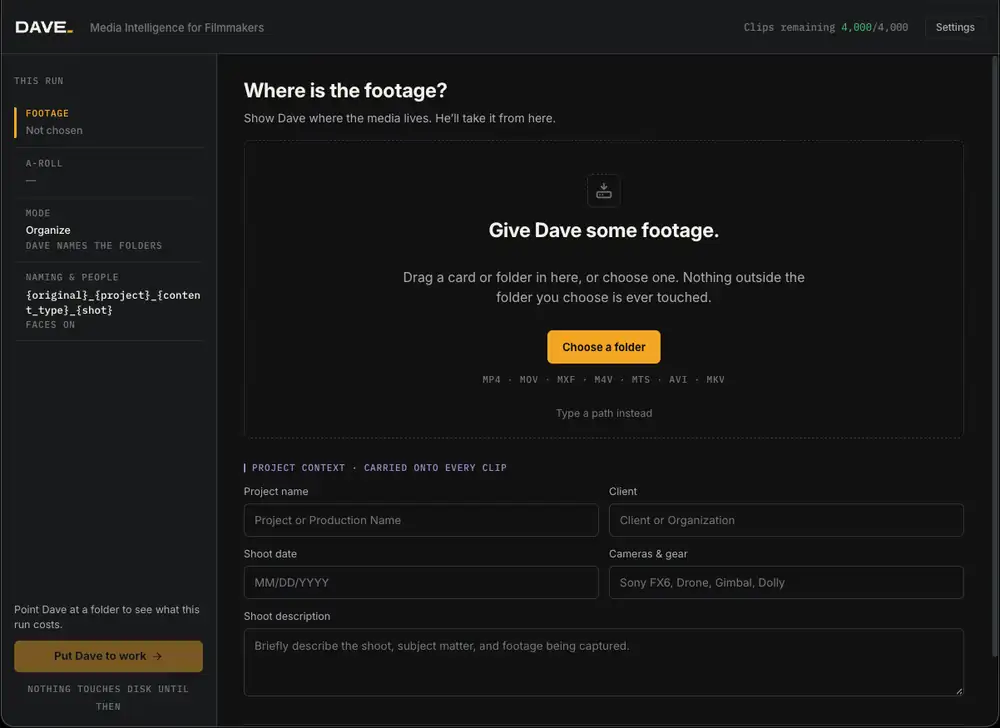
The Dave import screen asking where the footage is
STEP 01

Point Dave at the footage.

A card, a folder or a whole volume. Nothing outside the folder you choose is ever touched.
Choosing an organization mode in Dave
STEP 02

Tell Dave how much to touch.

Metadata only, rename in place, or a full tidy-up into folders. Your call, every run.
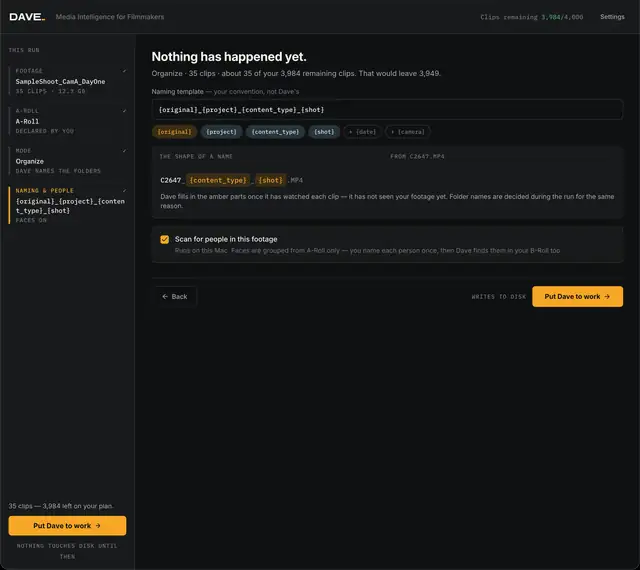
Setting the shape of a filename in Dave
STEP 03

Set the shape of a name.

Your naming convention, not Dave’s. Pick the tokens; Dave fills in what he learns from the clip.
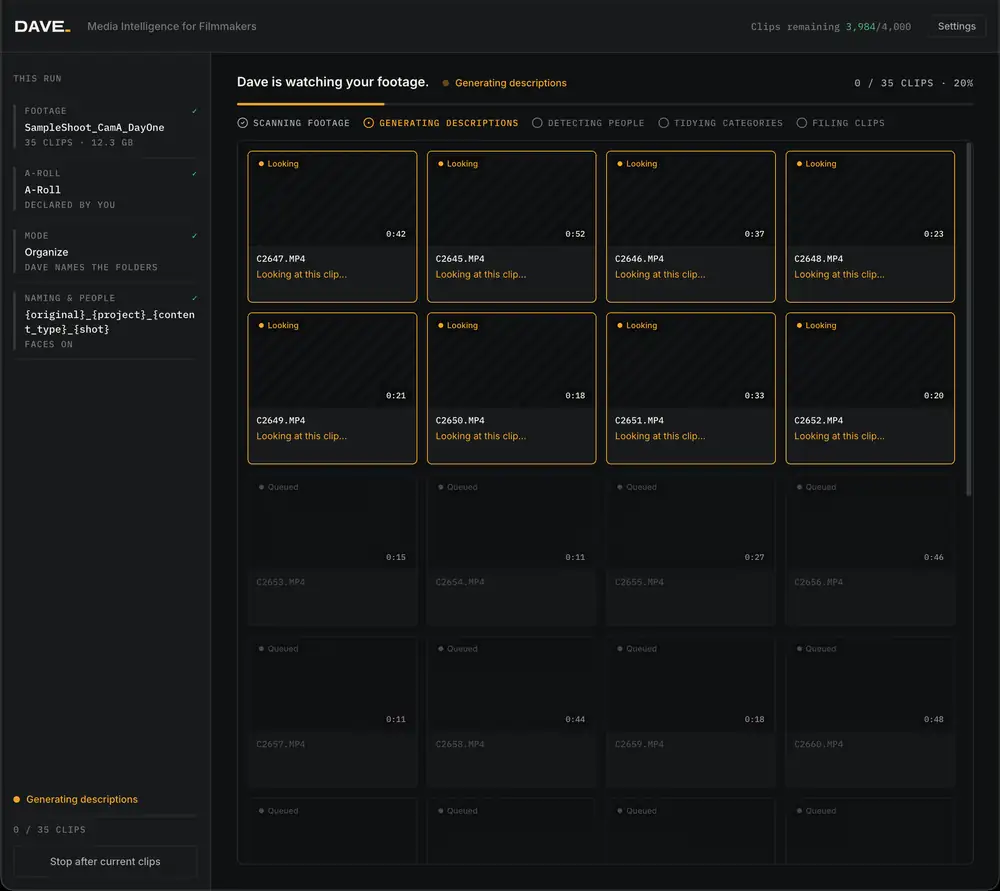
Dave analyzing a card of footage
STEP 04

Dave is watching your footage.

A real counter, the actual filename, a determinate bar and a step list. No spinner, no magic.
100 CLIPS FREE · NOTHING IS WRITTEN WITHOUT YOUR APPROVAL
WATCH A FULL RUN

25 clips, 6.1 GB, start to finish.

FOLDER → MODE → ANALYSIS → APPROVAL
BEFORE / AFTER

248 clips analyzed.

Camera names tell you which card a clip came off. Dave’s names tell you what is in it — and the description, tags and comments are written into the file itself.
OFF THE CARD
C2647.MP4
C2650.MP4
A001_C024.MOV
C2658.MP4
DAVE GENERATED
C2647_Client_Interview_Patrick.MP4
Patrick at the whiteboard, walking through the build schedule.
C2650_Client_BRoll_Welding.MP4
Close on the welder, sparks, shallow depth of field.
A001_Client_Exterior_Sunrise.MOV
Drone rising over the site at first light.
C2658_Client_Interview_Maria.MP4
Maria at her desk, two-camera setup, room tone at the tail.
ORGANIZATION MODES

Decide exactly how much Dave touches.

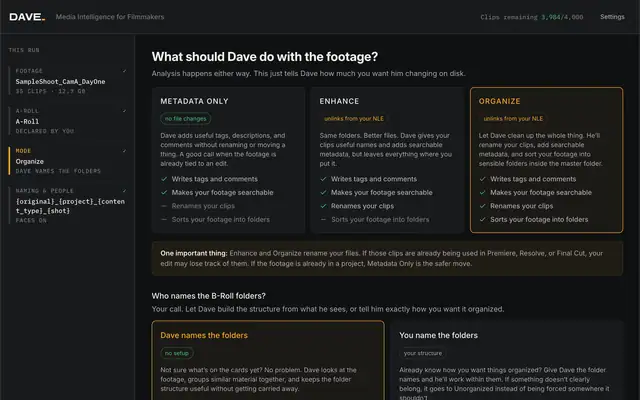
Analysis happens either way. The mode only tells Dave how much he is allowed to change on disk. Already deep in an edit? Metadata only leaves every filename and folder exactly where it is.
PICK A MODE
NO FILE CHANGES

Metadata only

Dave adds useful tags, descriptions, and comments without renaming or moving a thing. A good call when the footage is already tied to an edit.
SampleShoot_CamA_DayOne
4 OF 35 CLIPS
C2647.MP4
PATRICK · INTERVIEW · WHITEBOARD · 4K
C2650.MP4
WELDING · SPARKS · DETAIL · 4K
A001_C024.MOV
EXTERIOR · SUNRISE · DRONE · 4K
C2658.MP4
MARIA · INTERVIEW · DESK · 4K
FILENAMES UNTOUCHED · TAGS AND DESCRIPTIONS WRITTEN INTO EACH FILE
UNLINKS FROM YOUR NLE

Enhance

Same folders. Better files. Dave gives your clips useful names and adds searchable metadata, but leaves everything where you put it.
SampleShoot_CamA_DayOne
4 OF 35 CLIPS
C2647_Client_Interview_Patrick.MP4
PATRICK · INTERVIEW · WHITEBOARD · 4K
C2650_Client_BRoll_Welding.MP4
WELDING · SPARKS · DETAIL · 4K
A001_Client_Exterior_Sunrise.MOV
EXTERIOR · SUNRISE · DRONE · 4K
C2658_Client_Interview_Maria.MP4
MARIA · INTERVIEW · DESK · 4K
RENAMED AND TAGGED IN PLACE · SAME FOLDER, NOTHING MOVED
UNLINKS FROM YOUR NLE

Organize

Let Dave clean up the whole thing. He’ll rename your clips, add searchable metadata, and sort your footage into sensible folders inside the master folder.
SampleShoot_CamA_DayOne
4 OF 35 CLIPS
A-Roll / Interviews
C2647_Client_Interview_Patrick.MP4
PATRICK · INTERVIEW · WHITEBOARD · 4K
C2658_Client_Interview_Maria.MP4
MARIA · INTERVIEW · DESK · 4K
B-Roll / Detail
C2650_Client_BRoll_Welding.MP4
WELDING · SPARKS · DETAIL · 4K
B-Roll / Exterior
A001_Client_Exterior_Sunrise.MOV
EXTERIOR · SUNRISE · DRONE · 4K
RENAMED, TAGGED AND FILED INTO FOLDERS INSIDE THE MASTER FOLDER
One important thing: Enhance and Organize rename your files. If those clips are already being used in Premiere, Resolve, or Final Cut, your edit may lose track of them. If the footage is already in a project, Metadata Only is the safer move.
PEOPLE

Dave learns the people you actually work with.

Faces are grouped from your A-Roll, never named on a guess. You name each person once and Dave finds them across the B-Roll — and across the next job.

Grouped, not guessed

Unknown faces stay unknown until you say who they are. Dave hasn’t met them yet.

Got it. That’s Patrick.

Name a person once and Dave carries it across this job and the next one.

Runs on your machine

Face grouping happens locally. Your people database stays on your Mac.

BUILT FOR

Works the way you do.

Solo shooter with a shelf of drives, an in-house team with a shared server, or a weekend of event cards — Dave fits the workflow you already have.

Solo shooters

One person, four drives and no time to file anything. Dave does the filing.

In-house teams

One naming convention everyone follows, because nobody has to type it.

Events and weddings

Forty cards on Monday morning, sorted and searchable before the edit starts.

Documentary

Hundreds of hours across years. Find the person, the place and the line again.

Commercial and brand

Deliver footage a client can actually search after handoff.

Post and DITs

Metadata only mode keeps live edits linked while the tagging still happens.

GETTING STARTED

Short videos. No homework.

Install it, point it at a folder, and watch what happens. These cover the three decisions you make on every run.
TUTORIAL 01

Install and first run

From download to your first organized folder, in one sitting.
TUTORIAL 02

Choosing a mode

When to use metadata only, when to let Dave clean up the whole thing.
TUTORIAL 03

Reviewing before it is written

Reading the shape of a name, and unchecking what you disagree with.
PRICING

Choose how many clips a month.

Every plan has the whole toolset — analysis, descriptions, tags, metadata, people and all three organization modes. The only difference is how many clips a month Dave gets through.
FREE TRIAL · 100 CLIPS

Try Dave on real footage first.

Every install starts with 100 free clips. Run them on footage you already have, read what Dave proposes, and decide after you have seen the names.
ENTRY
$15
/ month
1,000 CLIPS PER MONTH
For the shooter with a steady trickle of cards and a drive that needs rescuing.
PROFESSIONAL
$30
/ month
2,500 CLIPS PER MONTH
For regular production work — several shoots a month, every one of them filed.
STUDIO
MOST CHOSEN
$40
/ month
4,000 CLIPS PER MONTH
For the shop shooting constantly, with an archive that has to stay searchable.
TEAM
$35
/ user / month
4,000 CLIPS PER USER
Same allowance for everyone on the crew. Pick your number of users and go. Three users minimum.
ONE CLIP = ONE VIDEO FILE, ANALYZED ONCE · UNUSED CLIPS DO NOT ROLL OVER · TEAM IS BILLED PER USER, THREE USER MINIMUM
FAQ

The questions editors actually ask.

Can I try it before paying?

Yes. Every install comes with 100 free clips. Run them on real footage, see the names Dave proposes, then pick a plan.

Does Dave change my files without asking?

No. Dave proposes, you approve. Nothing touches disk until you press Put Dave to work.

What if the footage is already in an edit?

Use metadata only. Dave writes tags, descriptions and comments without renaming or moving anything, so Premiere, Resolve and Final Cut keep their links.

Can I keep my own folder structure?

Yes. Give Dave your folder names and he works within them. Anything that does not clearly belong goes to B-Roll/Unorganized, and you see exactly what landed there.

What formats does Dave read?

MP4, MOV, MXF, M4V, MTS, AVI and MKV.

What counts as a clip?

One video file, analyzed once. The app shows what is left on your plan before every run.

Where does facial recognition run?

On your machine. Faces are grouped from A-Roll only, you name each person once, and the people database stays local.

Does Dave find duplicates or track my drives?

Not yet. Duplicate detection and drive tracking are on the roadmap and are not in the app today.
NEWSLETTER

Dave, in your inbox.

Release notes, new features and the occasional tip on keeping footage findable. No spam, unsubscribe anytime.
Dave mark

Dave remembers your footage.

Install it, point it at a card, and get on with the edit.
100 CLIPS FREE · MACOS 13+ · APPLE SILICON
Dave mark
FREE TRIAL · 100 CLIPS

Register for Dave.

Create your account and we’ll send the macOS download. Your first 100 clips are free, and nothing on disk changes until you approve the run.
NO CARD NEEDED · MACOS 13+